


Introduction
One of the largest challenges in adopting true multi-cloud environments (compared to just supporting multiple cloud environments as an organization) is controlling the spend. Technical challenges that may surround components existing in multiple cloud providers is nothing compared to the people and process headache that can surround chargeback as an application becomes more decentralized. An example situation may see credits in Google Cloud be extremely useful for prototyping an application before moving to host in the organization’s main landing zone which is in Azure. But this means that we’ve introduced two very different spending reports which can be difficult to properly reconcile.
Enter FOCUS (FinOps Open Cost & Usage Specification), which solves the challenge of comparing spend in various different CSPs (Cloud Service Providers) by presenting the data in a normalized and unit oriented manner. Spend data can be converted to this format through various tooling, but CSPs now offer exports which align to the FOCUS format, allowing cost reports from various CSPs to immediately be grouped together and used for generating reports and insights.
New Challenge: Getting FOCUS Data
While FOCUS solves the initial challenge of normalizing and combining data from various different sources, we still have a major problem in front of us. How do we actually get this data in the first place? While it’s easy enough to run a report in each CSP to generate the export, it’s another issue to build a system to combine it all. We have to think about various items such as export formats, which cloud will run the ETL, how do we secure networking/authentication to each CSP, and how do we even connect spend for apps across environments. We’ll tackle each of these issues here, starting with the beginning of the data pipeline, the export.
Creating the Exports to Import
While each CSP offers the ability to create an export, there are slight differences in the export itself. Below is a table comparing each CSP’s export capabilities as of the publishing date of this blog.
| CSP | Export Formats | FOCUS Versions Supported | Export Destination |
|---|---|---|---|
| AWS | GZIP, Parquet | FOCUS 1.2 (Latest) and FOCUS 1.0 | Amazon S3 |
| Azure | CSV, Parquet | FOCUS 1.2 (Latest) and FOCUS 1.0 | Azure Blob Storage |
| GCP | Data resides in BigQuery tables, which support various export formats, including JSON, CSV, Avro, & Parquet (when exporting from BigQuery) | FOCUS 1.0 (with BigQuery View/Looker Template) | BigQuery |
It is important to note that in this situation, GCP is behind the other cloud providers due to the fact that it only offers FOCUS 1.0, which can change how you integrate the data (either by matching exports or adapting columns used).
What ETL/Cloud to Use?
I’ll take advantage of one of the most powerful phrases in consulting here to answer this: “It depends”. Really you should be using the CSP that your organization is the most integrated in. It’ll likely be the same CSP that serves as the source for identities/AD, and has the most developed landing zone. While it’s possible to solve the technical challenge of handling identities, it’s very unlikely that each cloud environment is operating at the same capabilities, hence the recommendation to stick to the one which is easiest to operate in. As an example, for my current client, this would be Azure, as the governance/policies have been well defined, the deployment methodology and operations are matured, and identities are primarily sourced from Entra, making it the natural choice.
Now when it comes to the ETL portion, there shouldn’t be any significant complex flows to perform to join the data, so the best option would be to use a managed ETL tool (i.e., AWS Glue, Azure Data Factory, Google Cloud Dataflow). The goal here is to perform a pull against all the exports, as you want to centralize the orchestration rather than maintain multiple different tools to support pushing and collecting the data. Once you’ve pulled all the exports, it’s best to separate out the data into a star schema pattern, where you have a central “facts” tables that contains major details and foreign keys to the remaining “dimension” tables which can be joined to provide deeper analysis on data as needed.
One example setup for this pattern would be the following (using a very small subset of FOCUS data):
Facts Table
This table contains high level details on when the charge was, how much it cost, and how much was consumed for the cost, along with a key to link it to a more detailed dimension table.
| ChargePeriodStart | EffectiveCost | ConsumedQuantity | ConsumedUnit | DimensionKey |
|---|---|---|---|---|
| 2025-01-01 | 20 | 500 | GB | ABC |
| 2025-01-01 | 30 | 15 | Hour | DEF |
Dimension Table
This table contains additional details on the charge based on provider, service, and category. This can be joined to for a more detailed analysis of the data.
| DimensionKey | ProviderName | ServiceName | ServiceCategory |
|---|---|---|---|
| ABC | AWS | S3 | Storage |
| DEF | Azure | Virtual Machine | Compute |
Securing Connections to each CSP
This is where we start diving deeper into the technical challenges that can surround sourcing
data from multiple cloud environments. There are several key best practices that we want to adhere to:
-
Identities avoid long lived authentication methods
-
Identities are granted the least amount of privilege to pull the data
-
Network connections avoid the public internet (where possible)
-
Networking is done with microsegmentation in mind
Workload Identity Federation
Given that we are working in multi-cloud environments and want to avoid long lived credentials, we can use Workload Identity Federation to use an identity hosted in our main cloud to authenticate to the other CSPs. By running our ETL workload in our primary cloud, we can authenticate by interacting with the metadata server to retrieve a short-lived token, avoiding the need to keep a password stored anywhere.
From there, we just need to present the token to the other CSPs in order to get another short-lived token which can be used for authentication purposes within that CSP. See the below workflow for how this works in Azure as an example.
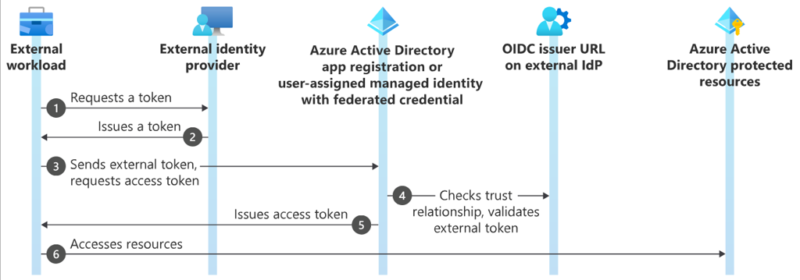
The key parts to this flow are in steps 4 and 6 in the above diagram, as this is where we have to define the trust relationship between identity providers, and then grant access to the resources. Each CSP has a method to enable this, with AWS using Identity Providers in IAM, GCP having Workload Identity Pools, and Azure using Federated Identity Credentials within App Registrations/Managed Identities. Once this trust relationship has been created, permissions can be granted by assigning permissions. AWS will assign permissions to a role with a trust policy for the identity provider and subject in the token (e.g., object ID of identity), GCP can attach the federated identity to a service account or grant access to the principal directly, and Azure will have permissions granted to the App Registration/Managed Identity connected to the previously setup Federated Identity Credential.
The one major issue with this is that there’s a fair bit of work involved to ensure the identity providers all trust each other and limit their trust to specific identities. That being said, this is a core component for any multi-cloud strategy, so some light work in implementing this feature can go a long way.
Role Based Access Control
Now that we have our identities available in each CSP, we need to grant permissions against the necessary resources to pull the export data. Recall that each CSP’s export could only target a specific storage resource in that CSP (or in GCP’s case, a BigQuery table). Since we only need access to where the data is hosted, it is best to get permissions against that specific resource only to keep in line with least privilege. It can be broken down into the following for each CSP:
| CSP | Permissions | Assigned Scope |
|---|---|---|
| AWS |
s3:GetObject s3:ListBucket |
S3 Bucket & Prefix with data |
| Azure | Microsoft.Storage/storageAccounts/blobServices/containers/blobs/read | Storage Account Container |
| GCP
bigquery.jobs.create bigquery.tables.getData |
Job role assigned at project level Table role assigned against target dataset |
Column 3 Value 3 |
Networking
While this can become very complex, the best way forward is to use the tools currently available in your environment and secure the connection to the best of your ability.
The most secure way to handle data is ideally to never let it reach the public internet, which is a major issue when thinking about multi-cloud. To fully take advantage of that, you would need a service like GCP’s Cloud-Cross Interconnect, which directly routes your GCP environment to other cloud providers through a co-location facility. If this has been set up for your organization, then you should have little worry about your data (but still best to perform defence in depth).
If you have to go over the public internet, then try to ensure the following are in place:
-
Encryption in Transit
-
Essential in almost every network connection. Use HTTPS when pulling the data, and ensure your resources are configured to only use HTTPS for data transfers
-
-
Site to Site VPNs
-
As a workaround for not having dedicated connectivity, best to set up a VPN tunnel between cloud environments to ensure that while you have to use the public internet to route between environments, the tunnel helps protect your data
-
If you can set this up, make sure to use private endpoints to access the data
-
-
Firewall
-
This is expected when routing traffic from your main cloud, but ensure that proper whitelisting is in place for private IPs in the other cloud environments (if a VPN tunnel can be configured) or the specific public endpoints that host the data (if public access has to be done)
-
Networking can easily become a major challenge, but it’s important to note that organizations can be in a crawl, walk, run situation for these domains, and the focus should be on how to best secure the environment rather than wait for a multi-year project to privately connect CSPs.
Bringing it Together Through Tags
I’ve talked a lot about how to set up the environment to support collecting FOCUS data across multiple clouds, but one major item that needs mentioning is how to actually link up the data for an application across said providers. This comes down to tagging, as FOCUS can obtain all tagging metadata that is attached to resources, making it an essential part of a multi-cloud cost reporting strategy. If tags are consistent across CSPs, then a simple check in the query for a specific tag key and value (e.g., app: myApp) is all that is required to link up the costs for a specific application even if it has been deployed to multiple clouds.
Conclusion
While this may have been a brief and broad overview, I hope it encourages you or your organization in working with FOCUS. The benefits of FOCUS are extremely clear, and my own experience has shown that the challenges lie mostly in actually getting the data, which is why I wanted to discuss it more with this topic. Once you have the data, the possibilities are endless in how your organization can enhance your FinOps practice.